
Introducing Budgets: track your energy spend
Compare your energy budget with modeled cost, track variances across sites and see where you stand while there is still time to act.
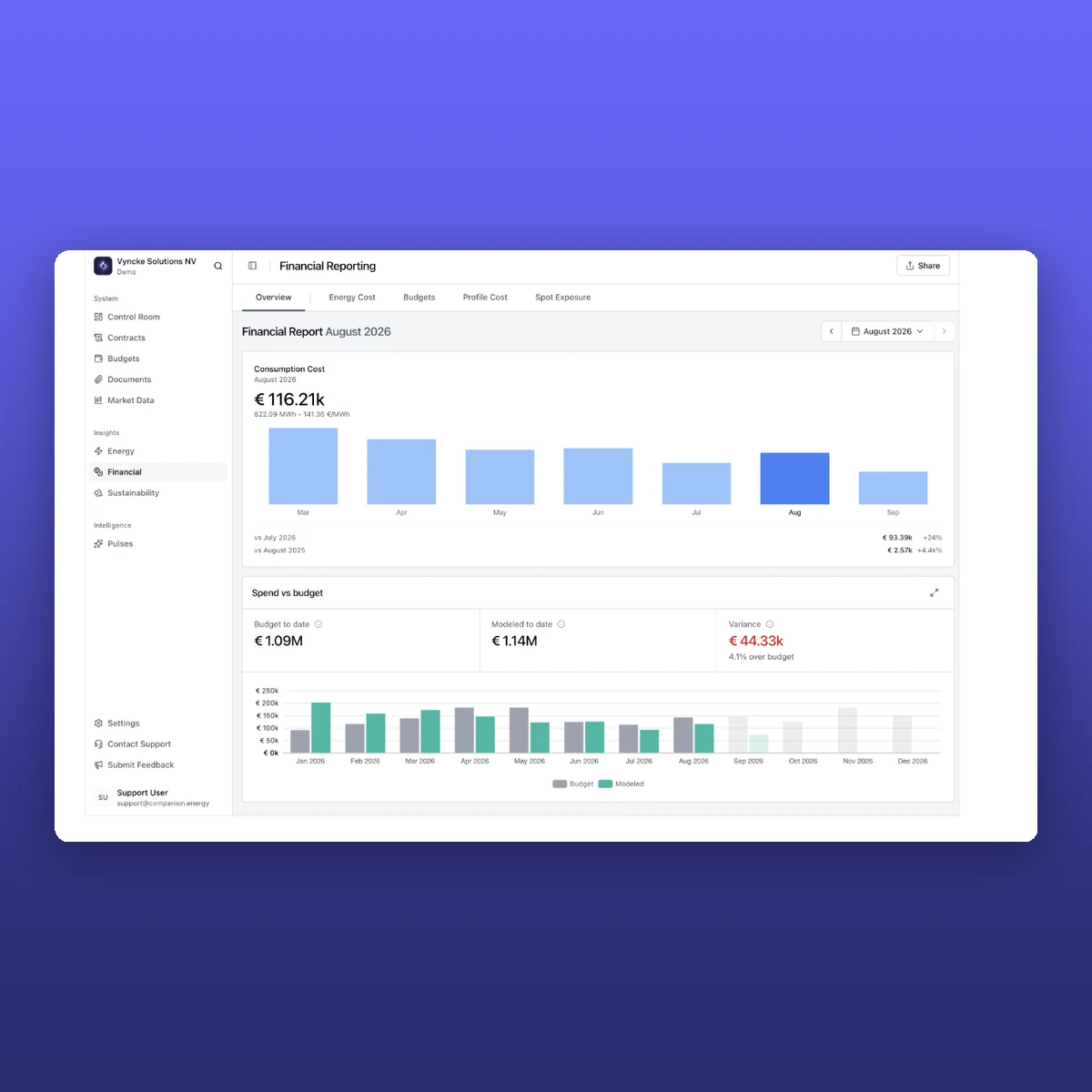


Most companies know their energy budget. The harder question is: are we still on track?
For many large energy users, the answer sits somewhere between a spreadsheet, an energy management system, an ERP and a supplier invoice arriving months later.
By the time the complete picture is available, a deviation may have become a very expensive fact.
One conversation made that painfully clear. A customer discovered, six months after the fact, that it was roughly €1 million over its energy budget. The information had arrived but simply too late.
So today we are launching Budgets.
A way to put the energy budget you already have next to your modeled energy cost, on the same structure as the rest of your energy data.
No parallel Excel comparison. No waiting for year-end reconciliation to learn where you stand. Just a current view of budget, cost and variance across your sites.

Why we built Budgets.
Finance may create the annual plan in Excel or Anaplan. Energy teams monitor consumption elsewhere. Contracts and hedges sit in another system. Invoices arrive in SAP or Oracle, often with a considerable delay.
Answering a simple management question then becomes a reconciliation exercise involving several people and several versions of the truth.
The problem is not that companies have no budget. It is that the budget and the information needed to follow it live apart.
Budgets is the first step toward closing that gap, with deeper reconciliation capabilities to come. It gives energy managers and finance teams one shared view of how planned spend compares with Companion’s modeled cost as the year unfolds.
What can you see?

At a glance, Budgets shows:
- your total energy budget;
- budget to date;
- modeled cost to date, updated through yesterday;
- the variance in euros and as a percentage;
- monthly performance and the developing full-year picture.
You can view this for one site or across a portfolio. Budgets follow the same country, site, and device structure already used in Companion, so site-level figures roll up into the wider organization. When something needs attention, you can move from the overview into Financial Reporting and inspect the cost behind it.
Do I have to build my budget again?
No. Budgets is designed to track the financial plan your organization already uses. You can enter the expected spend for the relevant period, adjust the monthly amounts to reflect seasonality, and assign the budget to the appropriate site or portfolio.
If you do not already have a budget prepared, Use last year provides a quick starting point. With one click, Companion uses the previous year’s modeled energy cost to create a budget for the new period, including its monthly distribution. You can then review and adjust the figures before saving them.
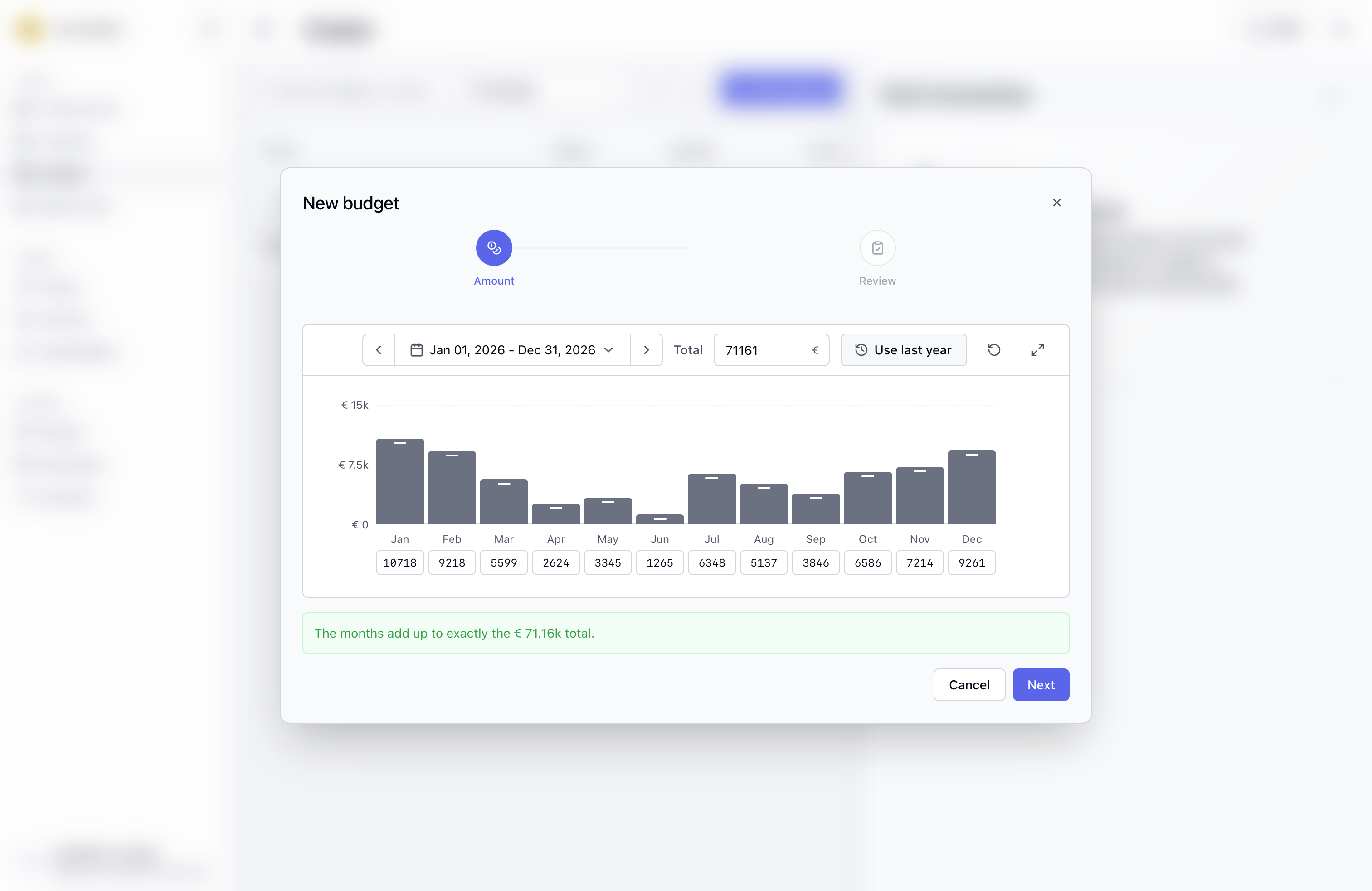
The result is a budget structure that mirrors the way your organization already reports without rebuilding the planning process around a new tool.
What are we comparing the budget with?
Budgets compares the plan with modeled energy cost in Companion. Companion’s cost model combines the energy information already available in the platform—including consumption, contracted prices, and the hedge book—to provide an early view of where spend stands. Future reconciliation capabilities will build on this by bringing modeled costs and supplier invoices closer together.
This is not invoice reconciliation. It is the earlier signal: the one that gives teams time to investigate a variance, explain it and decide whether action is needed.
Insert the Financial Reporting screenshot with Budget to date, Modeled to date and Variance above the monthly bar chart. Crop out unnecessary browser or page space, but retain the labels and legend so the meaning is unambiguous.
How can I stay up to date?
Bringing budget data into Companion also makes it available across the wider platform. Through upcoming AI agent capabilities and Pulse reports, teams will be able to receive automated budget updates in their inbox each month and ask questions about performance without having to compile the figures manually. See the full feature walkthrough to learn more.
Who is Budgets for?
Budgets is built for organizations with significant energy spend and multiple people involved in tracking it, particularly energy managers, business controllers and finance teams who need to answer questions such as:
- Are we still on track this year?
- Where is the variance coming from?
- Is it concentrated at one site or visible across the portfolio?
- What do we need to explain to Finance now, rather than months from now?
It’s especially useful when annual energy spend runs into seven figures, where even a small percentage deviation can have a material P&L impact.
Why does seeing it earlier matter?
A budget is most useful while there is still time to respond to it.
Bringing budget and modeled cost together does not remove volatility, change a contract or make a deviation disappear. It makes the financial effect visible sooner. That means less manual comparison, clearer internal reporting and fewer surprises after the decisions that could have changed the outcome are already behind you.
What comes next?
Budget tracking is the starting point. We are also exploring how Companion could help customers build their energy budgets, using the data already available in the platform to create a more informed starting point for the year ahead.
Budgets is now available to all Companion.energy customers. If you want to track your energy budget inside the platform, contact your Companion.